Slice Master : Idle Clicker
- 4.6
- Rating
- 10.00M
- Installs
- Free
- Price

 Analysis by App-foxy
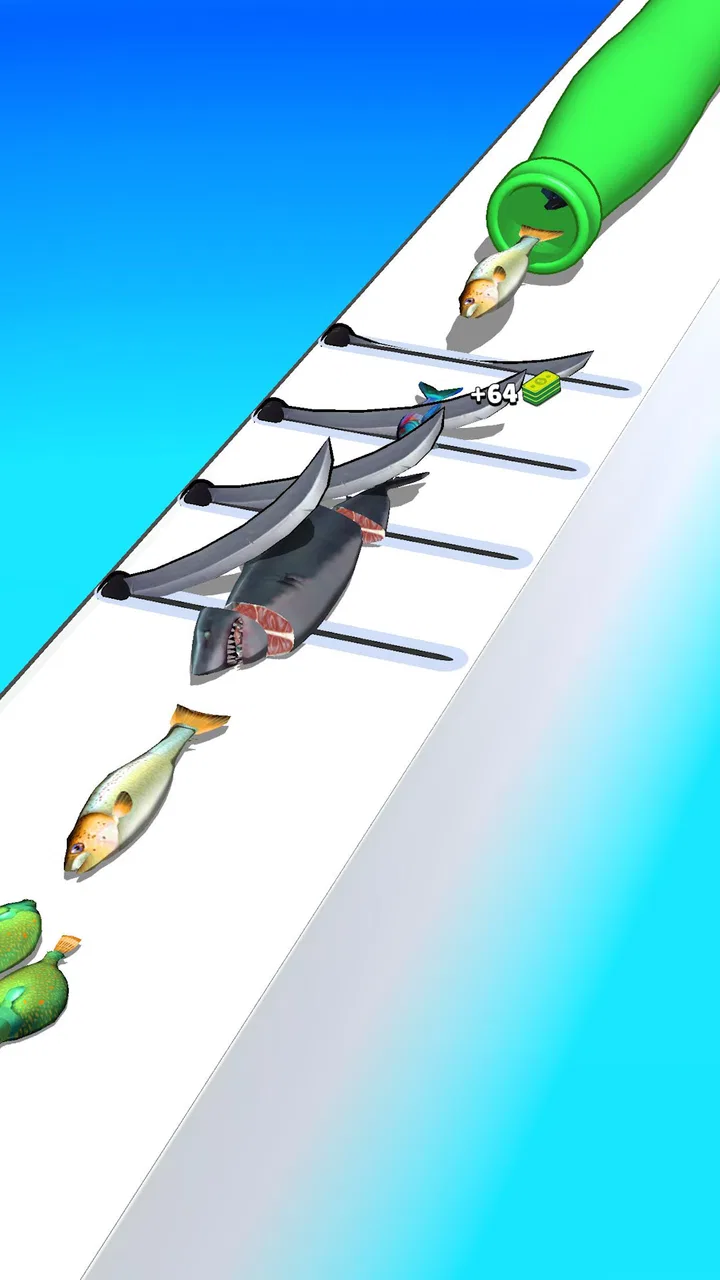
I approached Slice Master: Idle Clicker expecting a simple game to fill a few spare minutes, and that is exactly where it makes the most sense. The idea is immediately readable: improve your timing, work through fish-slicing tasks, and keep making progress without needing a complicated tutorial. It belongs to the simulation category, but it feels lighter and more casual than a traditional management simulator. The appeal is in the small, repeatable actions rather than in a large story or a demanding strategy layer.
After spending time with it, my main impression is that the game works best as a short-session distraction. I can open it, make a few attempts, and put it away without preparing for a long play session. That simplicity is also its biggest limitation. Players looking for deep systems, a substantial campaign, or the variety of a full cooking game may find the experience narrow. For someone who enjoys compact idle and skill-based games, however, the focused design is easy to understand and pleasantly accessible.
Getting past the first points of friction
The first place a new player can get stuck is not necessarily the slicing itself. It is the expectation that an idle clicker should do everything automatically. Here, the hands-on part matters. The game presents itself around improving precision, so tapping without paying attention can feel less effective than slowing down and learning the timing. I found that the best early approach was to treat the first few attempts as practice rather than trying to rush progress immediately.
You May Also Like

 Blood Strike: 2.5 Anniversary
Blood Strike’s Loadouts Turn Every Drop Into a Tactical Gamble
A close look at Blood Strike’s custom loadouts: how fast access to signature weapons reshapes its battle royale rhythm, rewards preparation, and narrows the gap between fights.

 Pandora - Music & Podcasts
Pandora’s Music Is Easy to Start, but Harder to Recover
Pandora’s strength is its low-effort path from a seed to a station. Its weak spot is how much confidence it asks you to place in connection, setup, and quiet recovery.

 8 Ball Pool
 Is Built on Rivalries, Rematches, and Routine
A close look at the rivalries, rematches, shared routines, and unanswered safety questions that turn a quick pool match into a persistent mobile community.

 Samsung Music
’s Quiet Strength Is Playing What You Already Own
Its reach comes less from spectacle than from dependable access to a personal library. That simplicity is both the app’s strongest retention engine and its ceiling.

 AccuWeather: Weather Radar
AccuWeather Review: A Quick, Clear Forecast for Everyday Decisions
For everyday plans, the best forecast is the one you can understand quickly. AccuWeather makes rain timing, radar, and local conditions easy to act on, with a few trade-offs.

 Hill Climb Racing
Why Hill Climb Racing Still Turns Crashes Into One More Run
A tiny car, a bumpy hill and one more upgrade: Hill Climb Racing keeps resurfacing because its simple chaos makes every near-miss feel personal.
More From Our News Desk



Another common source of frustration is judging the game too quickly. The basic action is easy to understand within moments, but the satisfaction comes from becoming more consistent. If every attempt is treated as a race, small mistakes can make the game seem more repetitive than it really is. I got more from it when I focused on clean, controlled actions and used short sessions to build familiarity.
The game is free to install, which makes trying it low-risk. It includes optional in-app purchases ranging from $0.49 to $29.99 per item, so I would approach the purchase screen carefully rather than assuming every improvement requires spending. My advice is simple: play long enough to decide whether the core slicing loop is enjoyable before considering any optional purchase. If the basic interaction does not feel satisfying, buying something will not solve that underlying issue.
Its Everyone content rating also makes it suitable for a broad audience, including younger players who want a straightforward game. That does not mean every player will enjoy it equally. Children may appreciate the direct action, while adults who prefer complex simulations may find the scope too modest. I would describe it as an approachable casual game first and a detailed simulator second.
Checks I would make before blaming the game
When a game does not behave as expected, I start with the basics. I check that the device is running Android 7.0 or later, since that is the minimum operating system listed for this release. I also make sure the game has finished installing properly and that the device has enough free storage for ordinary app operation. These checks sound obvious, but they eliminate many problems before more drastic steps are needed.
I also close other demanding apps before playing. A background download, a video call, or several heavy games left open can make touch responses feel delayed. That delay is especially noticeable in a precision-focused title because a missed input can look like a gameplay mistake. Testing it after clearing unnecessary background activity gives a fairer impression of whether the problem is really inside the game.
If the screen feels unresponsive, I test the device outside the game. I open another app and tap in the same area of the display. If touches are inconsistent everywhere, the likely issue is the phone or tablet rather than the slicing session. A dirty screen protector, moisture, or a case pressing against the display can also affect taps. Cleaning the screen and removing anything that interferes with the edges is a sensible first step.
For connection-related trouble, I switch between a reliable Wi-Fi connection and mobile data when available, then reopen the game. I would not repeatedly tap a purchase button while a connection is unstable. Waiting for the screen to respond is safer than assuming the first tap failed and trying several more times. This is especially important in any free game that offers optional purchases.
The current version is 1.0.4, so I would check the app page for an available update before spending time troubleshooting unusual behavior. Updates can address compatibility or stability problems, but I would still read the change information when it is available and avoid assuming that every problem will be fixed by updating. Restarting the device after an update is also a quick way to clear temporary background conflicts.
A practical recovery routine for stalled progress
When a session feels stuck, I use a gradual recovery routine instead of immediately uninstalling the game. First, I leave the current screen normally if the controls still respond. Then I close the app completely, wait a moment, and open it again. This simple reset is useful when the screen has stopped refreshing correctly or an input appears to have been ignored.
If the problem returns, I reduce the number of things happening on the device. I pause downloads, close streaming apps, and make sure the device is not overheating. Heat can make a phone feel sluggish, which is easy to mistake for poor game performance. I also avoid playing while the device is handling a large system update or restoring several apps at once.
I would be cautious with clearing storage or reinstalling. Those actions can remove local progress in some games, and I would not assume that progress is safely recoverable unless the game clearly explains how it is handled. Before taking that step, I would try a normal restart and confirm that the account or device is otherwise working correctly. Reinstalling should be a last resort, not the first response to a single frozen session.
If a purchase screen appears but does not complete, I would check the device’s app-store payment setup rather than repeatedly pressing the purchase control. A failed transaction can come from payment verification, connectivity, or the store account. The safest workflow is to wait, check whether the transaction actually went through, and only then decide what to do next. This avoids turning a temporary delay into an accidental duplicate attempt.
For performance, I prefer shorter sessions when the device is older or already warm. The game’s compact format makes that easy: I can stop after a few attempts and return later. That is more practical than changing several device settings for a title designed around quick play. If the game runs smoothly at first and becomes less responsive only after prolonged use, cooling the device and restarting it is a reasonable test.
Using the slicing loop more effectively
My most useful gameplay adjustment was to stop treating every tap as an opportunity to hurry. Precision games reward attention, and a deliberate rhythm made the interaction feel more controllable. I watched the action closely, made smaller corrections, and accepted that a slower successful attempt was better than a rushed miss. This is a simple habit, but it changes the feel of the game more than repeatedly tapping faster.
I also recommend separating practice from progress. During the first few minutes, I paid attention to how the controls responded instead of worrying about maximizing every result. Once the timing felt familiar, I could play more efficiently. This approach is particularly helpful for younger players or anyone who becomes frustrated by early mistakes, because it turns failure into information rather than a reason to quit.
A second useful habit is to play in planned bursts. I found that the game is better suited to a short break than to an extended marathon. A few focused minutes keep the action fresh, while a long session can expose the limited variety more quickly. It is a good fit for a commute, a waiting room, or a brief pause between tasks, provided the device can be used safely and without distracting from the surroundings.
The idle-clicker label may also encourage players to leave the game open constantly. I would not do that automatically. If the main appeal is active slicing, leaving the app running may add little value and can consume battery or device resources. I prefer opening it when I actually want to play, then closing it when finished. That workflow keeps the game in its proper role as a small pastime rather than turning it into background clutter.
For a child using the game, I would establish a simple rule about optional purchases before handing over the device. The free entry point is helpful, but the presence of paid items means the player should know that tapping through menus may have consequences. This is less about the game being unsuitable and more about making the spending boundary clear in advance.
When the problem is probably outside the app
Not every poor experience points to Oreon Studios or to the game itself. If other touch-based apps are also missing taps, the display deserves attention first. If only one device struggles while the game works normally elsewhere, the difference may be hardware age, available memory, or the device’s software environment. Comparing behavior after a restart can help separate a temporary slowdown from a persistent compatibility issue.
Network symptoms can be misleading too. A slow connection may affect store-related screens or other online-dependent parts of the experience, but it does not automatically mean the slicing controls are broken. I would test the controls separately from any store or account action. That distinction helps avoid changing settings unnecessarily when the real issue is a temporary service or connection delay.
Payment trouble should be handled at the platform level. I would verify the app-store account, payment method, and transaction history before contacting the developer. If the store shows a completed charge but the game does not reflect the result, I would keep the receipt details and use the appropriate support route rather than buying again. This is a practical safeguard for any free game with optional purchases.
There is also a human factor. A screen that feels inconsistent after a long day may be exposing tired timing rather than a technical fault. I noticed that rushed inputs produced worse results than calm ones, especially when I was trying to play while multitasking. Putting the phone down for a few minutes often helped more than changing settings. Slice Master is simple enough that concentration has a noticeable effect on the outcome.
Who will enjoy it, and who should choose something else?
I think this game suits players who like quick, repeatable interactions and want a low-commitment simulation experience. It is easy to explain to someone else, does not demand a large time investment, and offers a clear skill angle through the emphasis on accurate slicing. The free price also makes it convenient to test without committing money at the start.
It is less suitable for anyone expecting a full restaurant-management game, a story-driven cooking adventure, or a deep economy with many interconnected systems. Those players may be happier with a broader simulation that gives them staff, menus, layouts, or long-term planning. This title is more focused: its identity comes from the act of slicing and the repetition around it.
Compared with a conventional idle game, it asks more from the player than simply watching numbers rise. Compared with a reflex arcade game, it is calmer and more incremental. That middle position is its strongest point, but it also means it may not fully satisfy either extreme. Players wanting constant action may find it too gentle, while players wanting completely passive progress may find the active input too demanding.
The game has built a substantial audience, with over 10 million installs and a 4.6 average from around 86 thousand ratings. Those figures suggest that the straightforward concept has broad appeal, though popularity is not a substitute for personal taste. I would use them as a reason to try it, not as proof that it will match every player’s expectations.
Oreon Studios has kept the entry point approachable, and the release date of July 17, 2024, places it among relatively recent casual offerings. The version number, 1.0.4, indicates the release is still identified by an early version line, so I would keep expectations realistic about how expansive the experience may feel. That is not a criticism by itself; it simply reinforces the idea that this is a focused game rather than a huge, mature simulation platform.
My practical verdict after using it
The best reason to install Slice Master is its immediate, low-pressure loop. I can understand the goal quickly, practice precision without reading a long manual, and fit a session into a small gap in the day. The fish-slicing theme gives the interaction a clear identity, while the idle-clicker structure makes progress feel more relaxed than a demanding arcade challenge.
My recommendation comes with boundaries. I would install it for short breaks, casual practice, or a simple game to share with a younger player. I would skip it if I wanted deep simulation management, a substantial narrative, or enough variety for long daily sessions. I would also avoid spending until I had confirmed that the basic controls and repetition genuinely suited me.
When something goes wrong, I would begin with the device, connection, operating-system requirement, and background activity before assuming the game is at fault. I would restart before reinstalling, and I would treat payment screens with patience. Those small habits prevent most avoidable frustration and are especially worthwhile because the game is designed to be simple rather than technically elaborate.
Overall, I see this as a pleasant casual simulation with a clear skill component, not a replacement for a full cooking or management game. Its strongest use case is the spare-minute session: open it, focus on a few accurate actions, and leave before the repetition wears thin. For that specific purpose, the free download and broad Everyone rating make it easy to recommend, as long as you know you are choosing a compact slicing game rather than a deep virtual kitchen.
FAQs for Slice Master : Idle Clicker
01What is the main objective of Slice Master: Idle Clicker?
Slice Master: Idle Clicker is an engaging idle game where your primary goal is to build and manage a successful slicing business. Players start with simple tools and gradually upgrade their equipment to slice through various objects. As you progress, you earn more money, which can be reinvested to expand your operations and increase efficiency.
02Is Slice Master: Idle Clicker free to play?
Yes, Slice Master: Idle Clicker is free to download and play on both Android and iOS platforms. However, it offers in-app purchases that allow players to enhance their gaming experience. These purchases can include items like special tools, boosts, or cosmetic upgrades to help speed up progress or customize gameplay.
03Does the game require an internet connection?
Slice Master: Idle Clicker can be played offline, allowing users to enjoy the game without an internet connection. However, some features, such as leaderboards or special events, may require connectivity. Playing online also enables you to access updates and take advantage of the in-app purchase options.
04What kind of in-game upgrades are available?
In Slice Master: Idle Clicker, players can upgrade a variety of aspects, including slicing tools, speed, and efficiency. As you advance, you have the opportunity to unlock new slicing targets and enhance your workshop. These upgrades are crucial for maximizing your income and progressing through more challenging levels.
05Are there any social features in Slice Master: Idle Clicker?
Yes, Slice Master: Idle Clicker includes social features that allow players to connect with friends and compare progress. You can compete on leaderboards to see who has the most successful slicing operation. The game may also include occasional events or challenges that encourage social interaction and competition among players.
Pros
- Engaging and addictive gameplay loop.
- Simple controls and intuitive interface.
- Visually appealing graphics and design.
- Regular updates with new content.
- Offline play available for convenience.
Cons
- Repetitive tasks may become tedious.
- In-app purchases can be expensive.
- Ads can interrupt gameplay frequently.
- Limited customization options.
- Progression can feel slow without spending.

Slice Master : Idle Clicker
Gallery